By PURPLELEC | 29 December 2025 | 0 Comments
Choosing the Right Port: Thunderbolt 4 and USB-C
Evolutionary shifts toward ultra-thin laptop designs have transformed the docking station into a logical hub for the modern workspace. By integrating a high-density port matrix, these devices effectively compensate for the physical interface scarcity caused by the pursuit of extreme portability. Mastery of the technical boundaries and application logic for each interface is a prerequisite for constructing an efficient professional workstation.
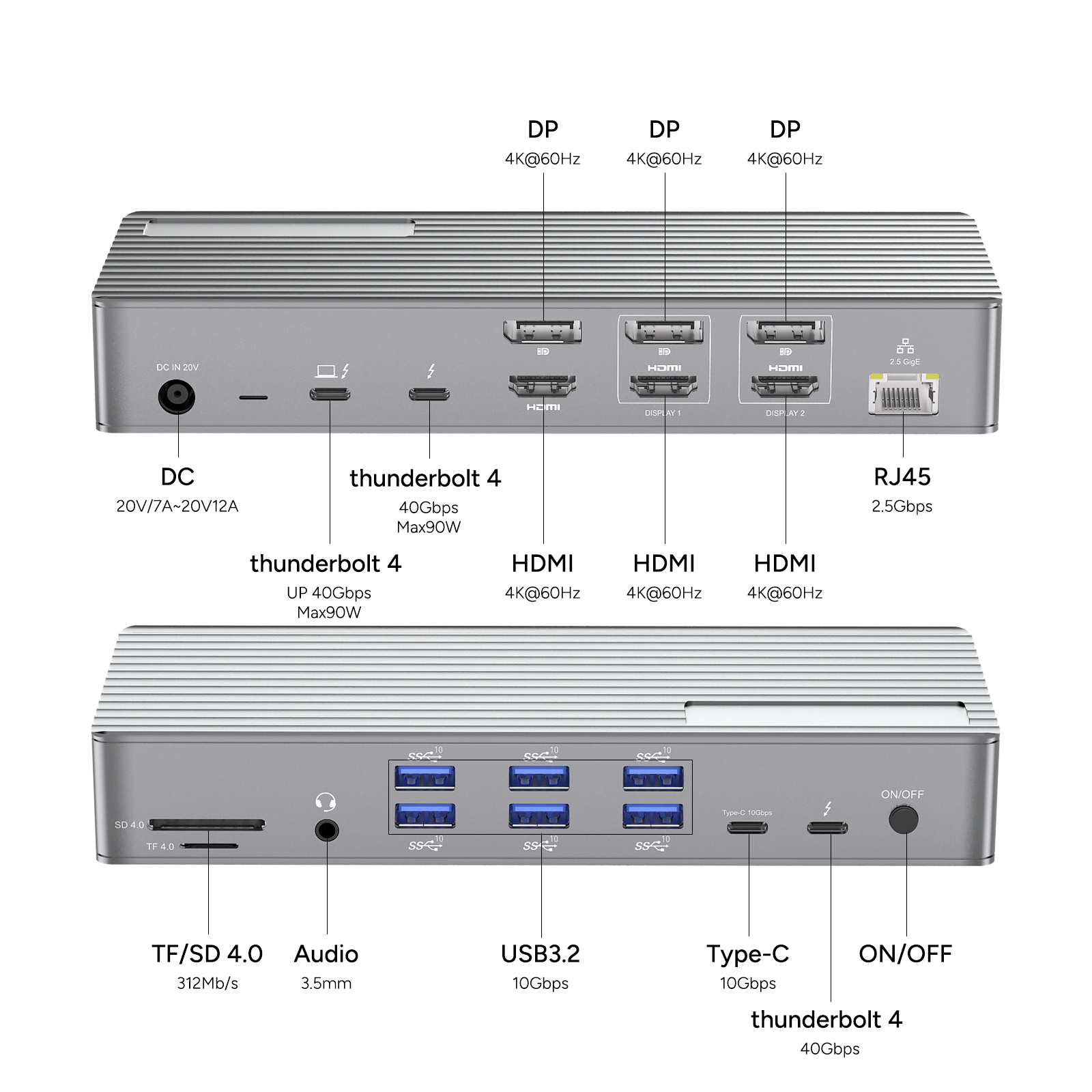
Hardware Expansion Architecture: Technical Analysis of Interface Standards
1. Universal Data Link: USB-A Interface
Although industry standards are migrating toward newer specifications, the USB-A port maintains a significant presence in the existing peripheral ecosystem. Its core function is to provide stable connectivity for mechanical keyboards, gaming mice, office printers, and various external hard drives, serving as a fundamental guarantee for daily expansion needs.
2. Composite Protocol Carrier: USB-C Interface
The USB-C interface has become the mainstream choice for modern mobile devices due to its reversible plug design and superior transmission ceilings. Beyond high-speed data exchange, this interface integrates video signal output and Power Delivery (PD) capabilities, enabling a "single-cable" multifunctional connectivity solution.
3. The Pinnacle of Performance: Thunderbolt Interface
Thunderbolt interfaces (currently dominated by Thunderbolt 3 and Thunderbolt 4) represent the upper limit of consumer connectivity performance. While sharing the physical form factor of USB-C, the underlying protocol supports throughput of up to 40Gbps. Its core value is reflected in:
Ultra-High Bandwidth: Capability to drive dual 4K 60Hz displays or a single 8K display simultaneously.
Daisy-Chain Expansion: Allows multiple Thunderbolt storage devices to be connected in a series without compromising transmission performance.
Full Downward Compatibility: The Thunderbolt 4 interface is fully compatible with all USB4 and USB-C devices.
4. High-Fidelity Video Pathways: HDMI and DisplayPort Interfaces
HDMI Interface: As the world's most ubiquitous digital audio-video standard, it is widely utilized for connecting 4K monitors, home televisions, or conference projection systems, ensuring consistent and high-fidelity synchronized transmission.

DisplayPort (DP) Interface: Its technical characteristics lean toward professional IT and gaming scenarios, supporting higher refresh rates and Multi-Stream Transport (MST) technology, making it the preferred choice for constructing multi-monitor arrays.
5. Power Management Unit: PD (Power Delivery) Interface
The PD interface follows the universal fast-charging protocols established by the USB Implementers Forum (USB-IF), designed to provide stable power input to the host device. Mature docking station products currently support input specifications of up to 100W, maintaining sufficient battery life for laptops while simultaneously expanding interface availability.
6. Multimedia Acquisition Assistance: SD/TF and 3.5 mm AUX Interfaces
Memory Card Slots: Integrated SD or TF readers significantly facilitate photographers and video creators in transferring assets directly from camera equipment.
Audio Interface: The 3.5 mm AUX port supports analog audio input and output, catering not only to high-fidelity headphones and speakers but also to external microphones for professional communication.
7. Stable Network Assurance: Gigabit Ethernet Port

Wireless networks (Wi-Fi) often experience latency fluctuations in complex environments, whereas Gigabit Ethernet ports provide superior connection quality. For scenarios requiring large-scale file downloads or remote conferencing, a wired connection offers more stable, high-speed bandwidth.
By identifying the technical specifications of these interfaces, users can precisely match hardware expansion solutions to specific business requirements regarding data throughput, video resolution, and power supply scale.
Enable SSD Hardware Encryption (SED) for BitLocker
USB 3.0 vs. 3.1 Hubs: A Guide to Picking the Right One
Leave a Reply
Your email address will not be published.Required fields are marked. *