By PURPLELEC | 19 August 2025 | 0 Comments
USB-C: A Comprehensive Analysis, Insights into Future Connectivity Trends
USB-C is now widely adopted in a wide range of technological products due to its superior charging and data transfer capabilities. Compared to its predecessor, USB Type-A (also known as USB 3.0), USB-C is faster and smaller, and most modern laptops, mobile chargers, and other devices now feature USB-C ports and cables.

However, the USB-C interface is more complex than you might think, with limitations in various application scenarios. Purplelec will help you clarify this with a comprehensive analysis of various USB-C interfaces, including preferred cable and adapter options, and recommendations for future technology applications.
Key Features
The USB-C interface represents a significant improvement over previous USB versions, making it the most common connection type on the market. Its standard features include:
Industry-standard connector: A single cable enables data and power transmission.
Reversible connection: No up-and-down restrictions, a major advantage of USB-C, unlike USB Type-A, which requires a specific connection orientation.
Connector unification: Standard cables have the same connector on both ends, unlike USB-A and USB-B.
Fast transfer speeds: 10Gbps transfer speeds are standard, and with Thunderbolt™ 3/4, speeds can reach 40Gbps.
USB-C was developed specifically to support thinner and lighter devices, with a slim connector suitable for smartphones and tablets. Its efficiency in video, networking, data transfer, and charging has replaced legacy ports such as RJ45 Ethernet and USB-A. Its success has inspired other protocols such as DisplayPort, HDMI, and Thunderbolt™ to adopt USB-C as a new connector standard. Furthermore, the USB Type-C connector pinout supports additional modes, such as DisplayPort Alt Mode (sometimes called DP Alt Mode), which allows a DP laptop or tablet to connect directly to an external monitor via the USB-C port.
USB-C Generations
Like laptop and computer hardware connection technology, USB cables have had many iterations, even within the same cable. Each generation of USB-C has introduced slightly different specifications, primarily in terms of transfer speed and compatibility.
Naming Rules
USB product generations are named based on speed and number of lanes. For example, some USB connectors offer a single-lane connection and 10Gbps bandwidth. However, USB-C 3.2 Gen 2x2 offers more than double the standard speed.
To simplify and ensure backward compatibility, the USB-IF (comprising hundreds of companies including Apple, Dell, HP, Intel, and Microsoft), the organization responsible for maintaining USB compliance, revised the naming standards to make them easier for developers and manufacturers to understand. The organization has been guiding the development of new USB specifications for years.
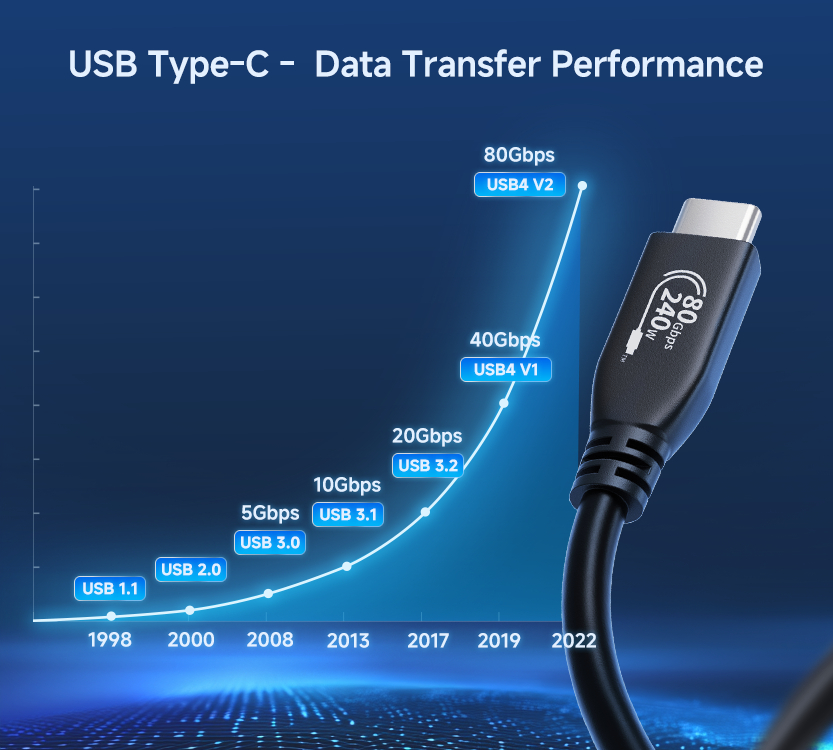
However, the new naming scheme can confuse consumers, making it difficult to determine which product to choose for home or mobile use. To help you understand how the specification applies to electronic devices, we've simplified the details of the widely accepted USB specification. Here's a look at the evolution of USB generations:
USB-C 2.0
USB 2.0 was first introduced in 2000, with a transfer speed of only 480Mbps (by today's standards). Despite technological advancements, relatively inexpensive USB-C to USB 2.0 cables are still available on the market that offer 100W power delivery, syncing, and charging capabilities, such as the USB-C 2.0 Cable - 100W Power Delivery.
USB-C 3.0 (USB 3.1 Gen 1/2) and SuperSpeed
Eight years later, USB 3.0 brought a major generational improvement, offering 5Gbps transfer speeds. After a reconfiguration by the USB-IF, USB 3.0 was renamed USB 3.1 Gen 1, with its Gen 2 version subsequently released. USB 3.1 Gen 1 supports speeds of up to 5Gbps, while Gen 2 reaches 10Gbps. To facilitate marketing and understanding of the differences, the designations SuperSpeedUSB 3.1 Gen 1 and SuperSpeed+ (USB 3.1 Gen 2) emerged. Because using the USB 3.1 Gen format makes it easier to broadcast transfer speeds, SuperSpeed is rarely used to distinguish between the two USB standards. This trend will continue in future USB generations, with both USB 3.1 Gen 1 and Gen 2 backwards compatible with USB 3.0 and USB 2.0.
USB-C 3.2
Nearly a decade later, USB 3.2 arrived. Its specification consists of four standards, each determined by bandwidth and number of lanes:
USB 3.2 1x1: Maximum transfer speed of 5Gbps (SuperSpeed), 1 data lane, 5Gbps total bandwidth.
USB 3.2 Gen 2x1: Maximum transfer speed of 10Gbps (SuperSpeed+), 2 data lanes, 10Gbps total bandwidth.
USB 3.2 Gen 1x2: Maximum transfer speed of 5Gbps (SuperSpeed), 2 data lanes, 10Gbps total bandwidth.
USB 3.2 Gen 2x2: Maximum transfer speed of 10Gbps (SuperSpeed+), 2 data lanes, 20Gbps total bandwidth.
While some USB 3.2 specifications still support USB-A, USB-C 3.2 marks a clear shift toward the USB-C protocol, bolstered by its faster peripheral charging, smaller size, and widespread use in office and technology environments. Both single-channel USB 3.2 standards still support USB-A ports, while the new USB-C standard delivers faster bandwidth.
Thunderbolt™ 3
Thunderbolt™ 3, a joint Intel and Apple interface, uses the USB-C protocol to connect peripherals to laptops and desktops.
USB4—The Future of USB
Although the USB4 standard hasn't yet gained widespread adoption in the tech world, most PC users consider it the next step in USB technology.
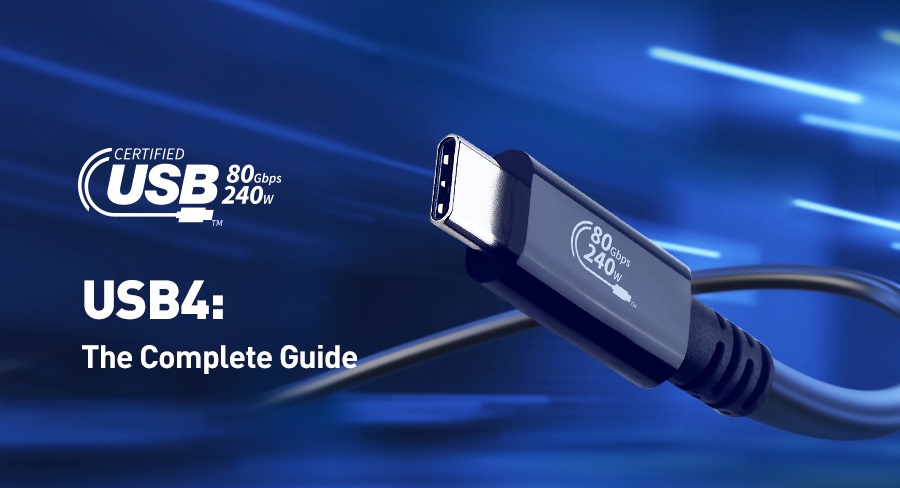
USB4 brings a host of new features to the evolution from USB 2.0 to 3.2. Unlike its predecessors, the USB4 protocol simplifies data transfer, requiring only a single USB-C to USB-C cable. USB4 devices must support 20Gbps (2.4GB/s) transfer speeds, and can deliver 40Gbps (4.8GB/s) when using shorter 0.8m Gen 3 cables.
USB4 Key Features
Broad Protocol Support: Supports USB 3.2, PCIe, and DisplayPort 1.4a through protocol tunneling technology, and supports DisplayPort and Thunderbolt 3 through Alt Mode.
Strong Connectivity and Compatibility: A single USB-C connection provides both data and display functionality, providing universal compatibility with all existing USB and Thunderbolt products.
Charging: All USB4 devices support USB PD. When a device is connected to a USB 4 port, USB PD negotiates a power delivery contract, safely delivering up to 100W (5A/20V).
Protocol Tunneling: Devices using the same protocol can establish a valid connection, using tunneling technology to send data from one protocol to another. The USB-C tunnel created over USB4 enables DisplayPort (DP) and PCIe data connections, similar to Alt mode, but without the need for a controller.
In-Depth Analysis of DisplayPort: The Preferred Connectivity Solution
DisplayPort vs HDMI: A Complete Guide to Connecting, Converting, and Troubleshooting
Leave a Reply
Your email address will not be published.Required fields are marked. *