By PURPLELEC | 05 November 2025 | 0 Comments
How to Choose an Ideal Laptop Docking Station?
An excellent laptop docking station’s core value lies in its ability to efficiently and stably expand a laptop’s connectivity, transforming it into a fully functional desktop workstation. When selecting one, focus on five core elements: types and quantity of ports, power delivery capability, data transfer speeds, video output specifications, and device compatibility. Understanding these key points will help you find the most suitable expansion solution for your needs.
Port configuration is the foundation of a docking station: A rich variety of ports and sufficient quantity directly determine its expansion capability. You need to check whether the docking station provides all the ports required for your daily workflow, such as HDMI or DisplayPort for monitors, USB-A and USB-C for peripherals, and an RJ-45 Ethernet port for wired internet. A well-equipped docking station saves you from repeatedly plugging and unplugging devices, achieving both a tidy desk and efficient connectivity.
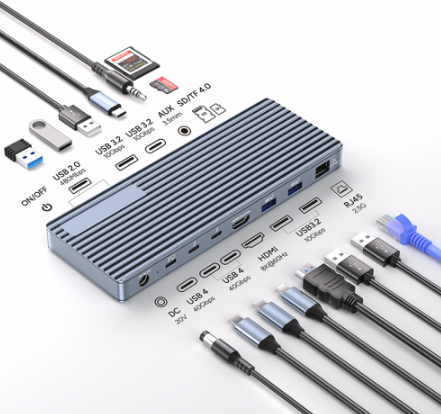
Power delivery capability determines whether the docking station can simultaneously charge your laptop and power all connected devices. The docking station’s power output must match your laptop’s power requirements. For instance, high-performance laptops typically require higher PD (Power Delivery) power. Insufficient power may lead to slow battery discharge on the laptop or unstable operation of all connected peripherals. Ensure the docking station’s power delivery specifications meet or even exceed the standards of your laptop’s original power adapter.
Data transfer speed is crucial for work efficiency: This primarily depends on the host interface technology connecting the docking station to your laptop. The current mainstream standard is USB-C, but its speed varies across different tiers. Thunderbolt interfaces offer extremely high bandwidth, suitable for transferring large amounts of data or connecting multiple high-resolution monitors. Standard USB-C docking stations can meet everyday file transfer and peripheral connection needs. Clearly defining your data transfer rate requirements is a prerequisite for choosing the appropriate interface technology. Products like the PURPLELEC DS020 docking station on the market offer 40Gbps transfer speeds, fully compliant with USB4 standards, meeting most professional users’ demands for high-speed data transfer.

Video output capability is key for connectingmonitors: The resolution and refresh rate supported by a docking station are determined by its video interface version. If you need to connect multiple monitors or a single high-resolution, high-refresh-rate monitor, you must confirm whether the docking station’s HDMI or DisplayPort interface version supports your target specifications. Additionally, the total bandwidth of the docking station limits the feasibility of multi-monitor setups, which should be considered alongside your laptop’s graphics processing capability.

Device compatibility is the final step to ensure stable operation: Not all docking stations work perfectly with all laptop models. Before purchasing, it is crucial to verify that the manufacturer explicitly lists your specific laptop model as compatible. This minimizes potential issues like monitor connection problems, unstable peripheral recognition, or charging interruptions.
Choosing a good laptop docking station involves a precise assessment of your own workflow and device characteristics. The ideal docking station should achieve a perfect match with your laptop and daily usage needs across these five dimensions—ports, power delivery, speed, video, and compatibility—seamlessly transforming your portable laptop into a powerful productivity hub.
Leave a Reply
Your email address will not be published.Required fields are marked. *