Quick answer: The core difference is the chip. An HDMI cable and a splitter are passive — they have no chip and only pass or copy a signal. A docking station has its own chip, so it can expand one port into many, charge your laptop, and drive multiple displays at the same time. If you only need to connect one screen, a cable is enough; if you need to mirror one signal to several screens cheaply, a splitter works; if you need to turn a laptop into a full workstation, you need a docking station.
| |
HDMI Cable |
Cable Splitter |
Docking Station |
| Built-in chip |
No |
No |
Yes |
| What it does |
Connects one source to one display |
Copies one signal to several outputs |
Expands one port into many port types |
| Charge laptop (PD) |
No |
No |
Yes, up to 100W |
| Multi-display |
Single display |
Mirrors the same image |
Independent dual / triple 4K@60Hz |
| Bandwidth |
Fixed by cable spec |
Low (passive) |
High, up to 40Gbps (Thunderbolt) |
| Extra ports (USB / LAN / SD) |
No |
No |
Yes |
| Price |
Low |
Lowest |
Higher |
| Best for |
One direct connection |
Cheaply mirroring one signal |
Full desktop-like expansion |
What is a splitter
A splitter is a device used to copy and distribute a single signal to multiple output ports. It is widely used in computer networks, televisions, audio, and other fields. The splitter copies the input signal into multiple output signals by means of resistor voltage division, so that multiple devices can use the same signal source at the same time. It can distribute a single signal to multiple terminal devices, achieving the effect of multiple devices using the same signal source at the same time.
What is an HDMI cable
An HDMI cable is a passive, point-to-point connection. It carries one video and audio signal from a single source (such as a laptop) to a single display, and nothing more. It has no chip, cannot expand or convert ports, cannot supply power to charge your laptop, and cannot drive more than one display. The capability of an HDMI cable is fixed by its own specification (for example HDMI 2.0 or 2.1), not by any processing of its own.
What is a docking station
A docking station, also known as a port replicator, is an external device designed for laptops. Its main function is to enable a laptop to connect to multiple accessories or external devices (such as power adapters, network cables, mice, external keyboards, printers, external monitors, etc.) in one stop by copying or even expanding the laptop's ports. This design is intended to make up for the defect that thin and light laptops carry fewer accessories, so that they can enjoy the same convenience and comfort as desktop computers when using them, while not losing the portability of laptops.
Specifications:
·Input USB C x1(Connect to host)
·1xType C(PD 100W)
·1 x HDMI(4K@60Hz)
·1 x USB A.3.2(10Gbps)
·2 x TypeC3.2(10Gbps)
·1 x Type C(Displaying port/10Gbps)
The core difference between the cable splitter and the docking station is that the cable splitter does not have a chip, but the docking station has a chip. That is to say, the data processing of the cable splitter still depends on the motherboard of the computer, while the docking station can rely on the chip for independent calculation. This brings about a huge difference in performance between the two. The hdmi docking station can have higher bandwidth than the splitter, and it can also drive many different types of external devices to run at the same time, and ensure high-quality data transmission, such as Thunderbolt 3 expansion. The dock can drive two 4K monitors at the same time and output 60 frames of images stably, which is impossible for the splitter.
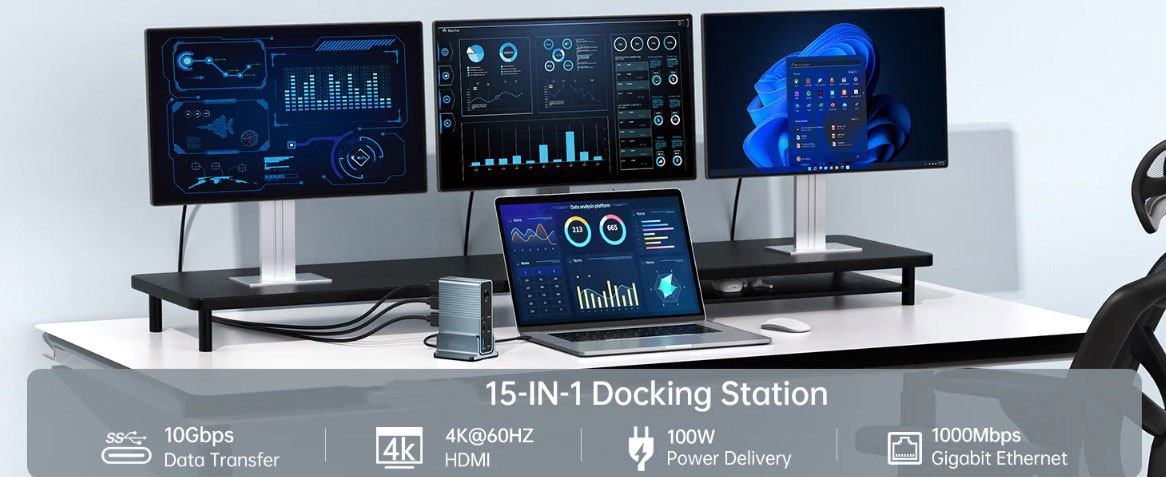
Specifications:
·Input Type Cx1(Connect to host)
·1xType C(PD3.0 with max 100W)
·1xHDMI(Max4K@30Hz)
·1xHDMI(Max4K@60Hz)
·1xDP(Max4K@60Hz
·1xRJ45 Gigabit Ethernet,10M/100M/1000M
·1xTF/Micro SD 3.0(Up to 104Mb/s)
·1xSD/MMC 3.0 (Up to 104Mb/s)
·1xAudio (3.5mm Audio&Mic
·2xType C 3.2(Max 10Gbps data transmission)
·3xUSB A 3.0(Max 5Gbps data transmission)
So from the price point of view, the hdmi docking station will also be more expensive than the cable splitter. If you just want to expand one interface into multiple and have no requirements for data transmission performance, you can buy a cheap cable splitter directly. If there are many types of signals to be transmitted and there are requirements for transmission quality, then it is necessary to purchase a docking station.
HDMI cable vs docking station
An HDMI cable and a docking station are built for completely different jobs, so they are not really replacements for each other. An HDMI cable simply moves one signal from your laptop to one screen — it has no chip, no port expansion, and no charging. A docking station uses an active chip to turn a single USB-C or Thunderbolt port into many: HDMI, USB-A, Ethernet, SD card, plus PD charging up to 100W, and it can run several displays independently at the same time. In short, an HDMI cable answers "how do I connect my laptop to one screen?", while a docking station answers "how do I turn my laptop into a full workstation?" If you only need one external display and your laptop already has the right port, a single HDMI cable is enough. But if you are short on ports, or you need to connect multiple devices and displays at once, a cable cannot do that and you need a docking station.
At present, as notebooks go further and further in the pursuit of lightness and thinness, there are fewer and fewer types of interfaces. For example, Apple’s MacBook only retains the type-c interface, so it can be said that it is a basic operation to equip a thin and light notebook with a docking station. However, it is precisely because the hdmi docking station can be adapted to a variety of different devices and has a large number of interface types, which makes it easy for Xiaobai to be confused and step on pits when purchasing.











